
High Quality Replacement Battery for Toshiba A50-0QR, PABAS292 Battery



- Product SKU:25DE209S7X
- Condition:Brand New
- Capacity:3000mah
- Voltage:14.8V
- Technology:Li-ion
- Color:Black
- Warranty:1 Year Warranty and 30 Days Money Back
 (Viewed: 444)
Your order will be dispatched within 48 hours.
⚡️ Reliability and security
Battery Dynabook PABAS292 is a high-quality replacement for your original battery, which meets all technical requirements for reliability and security.
⚡️ Safety and conformity certificates
Battery Dynabook PABAS292 has CE, FCC and ROHS certificates, and complies with all requirements for safety applicable within the territory of the EU member states.

PABAS292 Battery,Compatible with Toshiba A50-0QR
+Our batteries are 100% WITH CE-/FCC-/RoHS-Certified for safety
+We only uses high quality materials and grade A battery cells to ensure true capacity and more recharge cycles.
+Thorough, comprehensive testing – each battery cell is tested for correct capacity and to ensure all safety requirements are met - all before installation.
This Dynabook PABAS292 battery Replaces:
PA5245U-1BRS PA5358U-1BRS PA5359U-1BRS PABAS292 PABAS291This PABAS292 battery Fits The Following Dynabook Models:
for Toshiba A50-0QR/Portégé A30-C-14J/Portégé A30-C-14P/Portégé A30-C-14R/Portégé A30-C-14U/Portégé A30-C-14X/Portégé A30-C-16C/Portégé A30T-C1300ED/Portégé A30T-C1340/Portégé Z20T-C2100ED/Portégé Z20T-C2110/Portégé Z20T-C2112/R50-C-00C/Satellite Pro A30-C-135/Satellite Pro A30-C-1F3/Satellite Pro A40-C-13U/Satellite Pro A40-C-145/Satellite Pro A40-C-14T/Satellite Pro A50-C-028/Satellite Pro A50-C-1GL/Satellite Pro A50-C-1GR/Satellite Pro A50-C-1GW/Satellite Pro A50-C-1HF/Satellite Pro A50-C-1LR/Satellite Pro A50-C-1ML/Satellite Pro A50-C-1MM/Satellite Pro A50-C-1MN/Satellite Pro A50-C-1MQ/Satellite Pro A50-C-1NG/Satellite Pro A50-C-1U1/Satellite Pro R40-C-10W/Satellite Pro R40-C-10X/Satellite Pro R40-C-110/Satellite Pro R50-01T/Satellite Pro R50-B-01R/Satellite Pro R50-B-01T/Satellite Pro R50-B-107/Satellite Pro R50-B-109/Satellite Pro R50-B-10D/Satellite Pro R50-B-10E/Satellite Pro R50-B-10G/Satellite Pro R50-B-10H/Satellite Pro R50-B-10J/Satellite Pro R50-B-10K/Satellite Pro R50-B-10L/Satellite Pro R50-B-10R/Satellite Pro R50-B-10T/Satellite Pro R50-B-10U/Satellite Pro R50-B-10V/Satellite Pro R50-B-10Z/Satellite Pro R50-B-110/Satellite Pro R50-B-112/Satellite Pro R50-B-113/Satellite Pro R50-B-114/Satellite Pro R50-B-116/Satellite Pro R50-B-119/Satellite Pro R50-B-11C/Satellite Pro R50-B-11F/Satellite Pro R50-B-11L/Satellite Pro R50-B-122/Satellite Pro R50-B-123/Satellite Pro R50-B-12H/Satellite Pro R50-B-12N/Satellite Pro R50-B-12P/Satellite Pro R50-B-12Q/Satellite Pro R50-B-12R/Satellite Pro R50-B-12U/Satellite Pro R50-B-12V/Satellite Pro R50-B-12W/Satellite Pro R50-B-12X/Satellite Pro R50-B-14F/Satellite Pro R50-B-14T/Satellite Pro R50-B-150/Satellite Pro R50-B-154/Satellite Pro R50-B-155/Satellite Pro R50-B-156/Satellite Pro R50-B-159/Satellite Pro R50-B-15G/Satellite Pro R50-B-15J/Satellite Pro R50-B-161/Satellite Pro R50-B-167/Satellite Pro R50-B-169/Satellite Pro R50-B-16V/Satellite Pro R50-B-170/Satellite Pro R50-B-186/Satellite Pro R50-C-008/Satellite Pro R50-C-02U/Satellite Pro R50-C-07P/Satellite Pro R50-C-10W/Satellite Pro R50-C-114/Satellite Pro R50-C-115/Satellite Pro R50-C-117/Satellite Pro R50-C-11P/Satellite Pro R50-C-12E/Satellite Pro R50-C-12N/Satellite Pro R50-C-134/Satellite Pro R50-C-13D/Tecra A40-C/Tecra A40-C-13Z/Tecra A40-C1440/Tecra A40-C-14U/Tecra A40-C-169/Tecra A40-C-17C/Tecra A50-C-00J/Tecra A50-C1510//Tecra A50-C-16G/Tecra A50-C-16H/Tecra A50-C-16J/Tecra A50-C-16K/Tecra A50-C-16L/Tecra A50-C-16U/Tecra A50-C-179/Tecra A50-C-19L/Tecra C40-0ND03K/Tecra C40-C1400ED/Tecra C40-C1430/Tecra C50-01301H/Tecra Z50-034007/Tecra Z50-C/Tecra Z50-C1550
FAQs
Q: How to charge the Dynabook PABAS292 battery properly?
A: You should charge the replacement battery for Dynabook PABAS292 before the battery exhaustively discharged, otherwise it will shorten its life. It is feasible to charge the laptop battery before the power is less than 20%. Meanwhile, the battery should be charged in a dry place, and please pay attention to high temperature, which is the biggest threat to battery life.Q: How to deal with the replacement battery for Dynabook PABAS292 when you won't use for a long time?
A: If you let your Dynabook PABAS292 battery lay idle for a long time, please charge the laptop battery or discharge to about 40%, and then put it in a dry and cool place to save. Indoor temperature is best maintained at 15 to 25 degrees Celsius because the temperature is easy to accelerate the battery aging either too high or too low. You'd better fully charge and discharge the battery at least once a month. Finally please save it in accordance with the above method.Q: How to replace your Dynabook PABAS292 Battery?
1.Turn off your Dynabook PABAS292 laptop and disconnect the AC adapter.2.Release the latch or other attachment devices that hold your battery in place.
3.Slide the old battery out of its compartment or storage bay
4.Take the replacement battery for Dynabook PABAS292 laptop out of the box.
5.Slide it into the notch or bay.
6.Close the safety latch to lock it into place.
7.Reconnect the AC adapter and give the new battery for your Dynabook PABAS292 notebook a full charge.
Tags:Dynabook PABAS292,Dynabook PABAS292 battery,Dynabook PABAS292 Laptop Battery,Dynabook PABAS292 Batteries,replacement battery for Dynabook PABAS292,Toshiba A50-0QR.
Shipping & Handling
Free Shipping on All Products
All orders placed for Standard Shipping on all stock items will be shipped within 1 - 2 business days.
Estimated Delivery Time:7 - 15 Business Days
It is very easy for you to check the status of your order and locate the package during transit, as an email with a tracking number will be sent to your email address after your order has been shipped out. Tracking number will be emailed to buyer once your ordered item is shipped out.
Attention: Priority mail will be used for all PO Box shipping addresses ,But All APO's and military addresses do not apply here. Please use standard shipping for these. Thank you.
Payment Methods
How can I find my battery’s part number?
1.Make sure the laptop is unplugged and turned off, and that the battery has cooled.
2.Flip the laptop upside down. Push the battery latch to the left "unlock" position. While holding the latch in this position, slide the battery out of the computer.
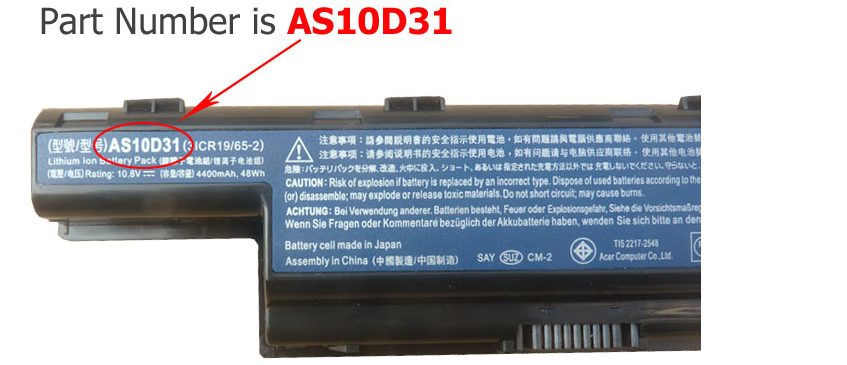
3.Look for the serial number that is printed on the label on the back of the battery. The serial number will be a combination of some letters and numbers that more conspicuous.
4.For you convenience, please refer to the pictures below to see an example for a A32-K93 part number:
How to Find the Model of My Laptop Computer?
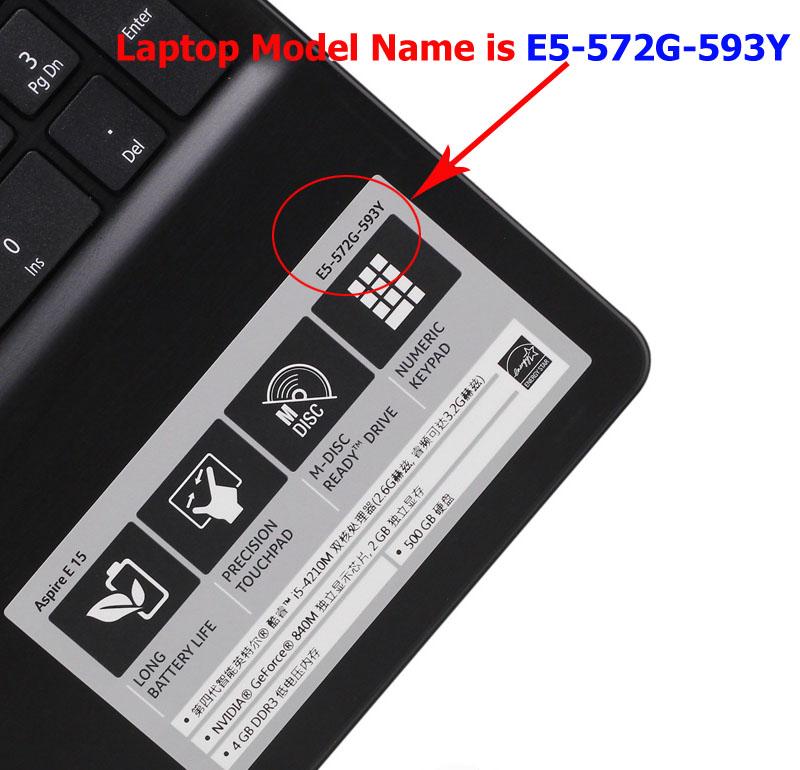
1.Open the laptop and check the area near the keyboard first. Manufacturers commonly print the computer model (such as Aspire 4736G for a Acer computer) on or near the keyboard.
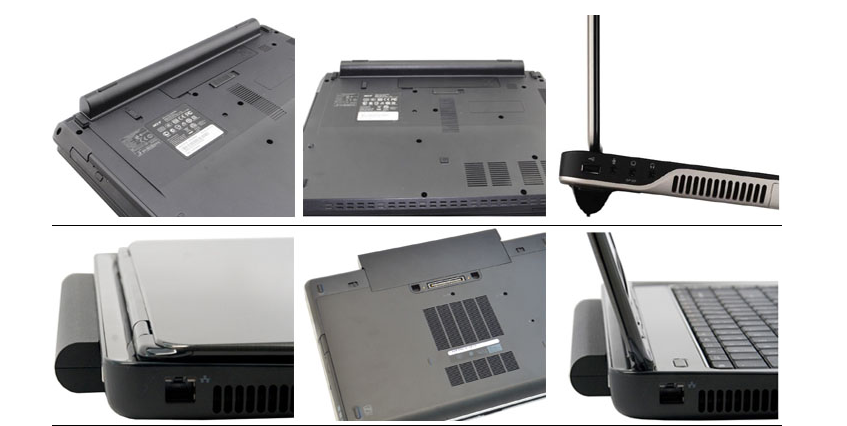
Please note : High capacity batteries with the bigger size shape, and them will extend out about 1 inch from the bottom / side of the laptop.
.jpg)
.jpg)
.jpg)
.jpg)